
Tesla Model Y Charging Problems and Fixes
The Tesla Model Y, a beacon of electric vehicle innovation, often presents owners with unique charging challenges. From unexpectedly slow Supercharging speeds to home charger compatibility issues, these problems can disrupt daily routines.
Common frustrations include the popular Unable to Charge error, reduced performance in cold weather, and temperamental third-party station connections. Fortunately, many issues are solvable. This article explores the most frequent charging pitfalls, from software glitches to hardware malfunctions, and provides practical, step-by-step remedies.
Whether you're dealing with a stubborn charge port or optimizing your home setup, understanding these fixes can restore convenience and confidence in your electric driving experience.
Common Tesla Model Y Charging Problems and Practical Fixes
Tesla Model Y owners may encounter various charging issues, ranging from software glitches to hardware malfunctions. Understanding these problems and their solutions is crucial for maintaining optimal vehicle performance and battery health.
Here are the most frequent issues and how to address them.
Intermittent Charging or Charging Stops Unexpectedly
One of the most reported problems is when the Model Y stops charging mid-session or fails to initiate a charge. This often stems from a faulty connection between the charge cable and the vehicle's charge port, a temporary firmware bug, or overheating at the wall connector.
The first fix is to inspect the charge port for debris and ensure the connector is fully seated. You may also try resetting the vehicle by holding down both scroll wheels on the steering wheel until the touchscreen restarts.
If the issue persists, check your charging schedule settings in the car's menu an active schedule can prevent immediate charging. For overheating, reduce the charging current to 80% or lower through the Tesla app to allow the system to cool down.
Slow Charging Speeds at Home or Superchargers
Many users notice that their Model Y charges slower than expected, especially when using a Level 2 home charger or a Supercharger. This is commonly caused by a low battery pack temperature, a de-rated Supercharger stall, or a tripped breaker.
To fix slow home charging, pre-condition your battery by setting a departure time in the app, which warms the battery during cold weather for faster energy absorption.
At Superchargers, if you're sharing a cabinet with another Tesla, your speed may be limited; move to a stall with a higher number (e.g., 2A or 2B) that is less likely to be shared. Also, ensure your charge cable is rated for 40 amps or higher; using a 32-amp mobile connector on a 240V outlet can cap charging at 30 miles per hour instead of 44.
Error Messages and Charge Port Malfunctions
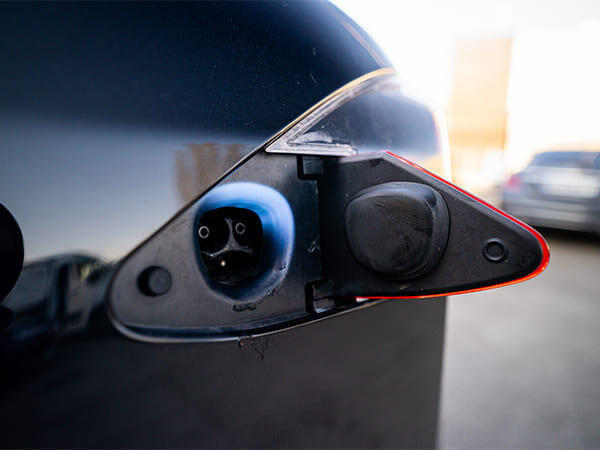
Errors like Charge Port Door Won't Open or Charging Equipment Not Detected can be frustrating and are often due to frozen latch mechanisms, failed charge port electronics, or incompatible charging cables. For a stuck door, try pulling the manual release strap inside the trunk near the charge port.
If the error is software-related, perform a hard reset by disconnecting the 12-volt battery for 10 minutes, or push the charge port button manually while inserting the connector.
If the charge port still fails to detect the cable, a common fix is to clean the charging contacts with a non-abrasive cloth and apply a small amount of dielectric grease to the metal pins to prevent corrosion. If none of these work, schedule a mobile service visit for a charge port replacement.
| Problem | Common Cause | Fix |
|---|---|---|
| Charging stops abruptly | Loose connector or firmware bug | Reset via scroll wheels; inspect port for debris |
| Slow charging at home | Cold battery or low current limit | Pre-condition battery; set departure time in app |
| Charge port won't open | Frozen latch or software glitch | Use manual release in trunk; hard reset the vehicle |
| Supercharger low speed | Shared cabinet with another Tesla | Move to a non-shared stall (e.g., 2A/2B) |
Understanding Common Tesla Model Y Charging Issues and Their Solutions
Tesla Model Y owners frequently encounter charging problems that can stem from various sources, including incompatible charging stations, temperature-related power limitations, or software glitches affecting the Battery Management System (BMS).
One common issue is slow charging speed, often caused by using a level 1 household outlet instead of a dedicated Tesla Wall Connector, or by a cold battery in winter that reduces charge acceptance.
This content may interest you! How Regenerative Braking Works in the Tesla Model Y
Another frequent problem is the charge port failing to open or the car not recognizing a plugged-in cable, which may require manual release via the touchscreen or a physical latch check.
To fix these, ensure your software is up-to-date, use a dedicated circuit for home charging, and precondition the battery via the app before arriving at Supercharger stops. For persistent errors like "Charging Stops Unexpectedly," inspect the charge cable for damage or try a different charging station to rule out source issues.
Slow Charging Speed Due to Insufficient Power Supply
If your Model Y charges at a much slower rate than expected, the most likely cause is an inadequate power source, such as a standard 120V outlet providing only 3 to 5 miles of range per hour. For faster home charging, install a 240V outlet or a Tesla Wall Connector to achieve up to 30 miles of range per hour.
Additionally, the car may limit charging speed if the battery temperature is too low; to avoid this, schedule Departure Charging in the app so the car warms the battery before you plug in.
Charge Port Not Opening or Faulty Latch
A common mechanical issue is the charge port door refusing to open or the latch not engaging properly when plugging in the cable. This can be due to ice buildup in cold weather, debris in the port, or a stuck solenoid.
To fix it, try manually pressing the door while pressing the charge port button on the cable, or use the touchscreen's manual release under Controls > Service. For persistent problems, a soft reset of the car (holding both scroll wheels) may recalibrate the port mechanism.
Charging Stops Unexpectedly or Intermittent Connection
Some owners report that their Model Y stops charging after a few minutes, often accompanied by a red ring around the charge port. This usually indicates a ground fault or overheating in the connector. Check that the charging plug is fully seated and the home circuit breaker hasn't tripped.
At Superchargers, this may be a station malfunction; try moving to a different stall. If the issue persists at home, have an electrician inspect your outlet for loose wiring or corrosion.
Error Messages Like "Charging Equipment Not Detected"
If the touchscreen shows that no charging equipment is detected even though the cable is connected, it could be a software communication error or a faulty charge cable. First, restart the car via the touchscreen menu (Safety & Security > Power Off), then lock and walk away for 5 minutes.
If that fails, try a different charging cable to isolate the issue. Rarely, the onboard charger may need service, but always start with checking the charging port pins for dirt or damage.
Supercharger Slow Speed or Derating
When using a Supercharger, you may notice the charging speed is much lower than the advertised 250 kW, often dropping to 50-70 kW early in the session.
This is typically due to low battery temperature—the car automatically limits current to protect the battery unless you precondition it. To trigger preconditioning, set the Supercharger as your navigation destination at least 30 minutes before arrival. Additionally, shared Supercharger stalls (A/B pairs) split power, so always choose a separate stall if possible.
Frequently Asked Questions
Why does my Tesla Model Y take longer to charge in cold weather?
Cold temperatures slow down battery chemistry, reducing charging speed. The Model Y’s battery management system limits current to protect the cells. Preconditioning the battery via the mobile app about 30-45 minutes before charging helps, as the car warms the battery. Using a Level 2 charger overnight is also more efficient than relying solely on Superchargers in freezing conditions.
What should I do if my Tesla Model Y stops charging mid-session?
First, check for a tripped circuit breaker or GFCI outage at your outlet. Inspect the charging cable for damage or overheating at the handle. The car may pause if the connector is partially plugged in or if the battery is too hot. Reseating the charger and restarting via the touchscreen often resolves this. Persistent issues may require a service appointment.
How can I fix slow Supercharging on my Tesla Model Y?
Slow Supercharging is often due to a cold or overcharged battery. Navigate to a Supercharger in your Tesla’s map to trigger preconditioning. If the station is busy, charging speeds may be shared. Ensure you’re below 20% battery when arriving for optimal rates. Check for software updates, as new firmware can improve charging curves. Overheating may also throttle speed.
Why doesn’t my Tesla Model Y charge at all with a mobile connector?
Verify the mobile connector is fully inserted into both the wall outlet and the car. Check that the outlet is delivering power by testing with another device. The connector’s firmware may need updating via your Tesla account. Inspect for debris or damage in the charge port or plug. If using an adapter, ensure it’s properly attached. A flashing red light indicates a fault, requiring service.
This content may interest you! Kia Cerato Radio Not Working: Causes, Fixes, and Reset Guide
Leave a Reply