
Nissan Murano Key Fob Not Working: Causes, Fixes, and Troubleshooting
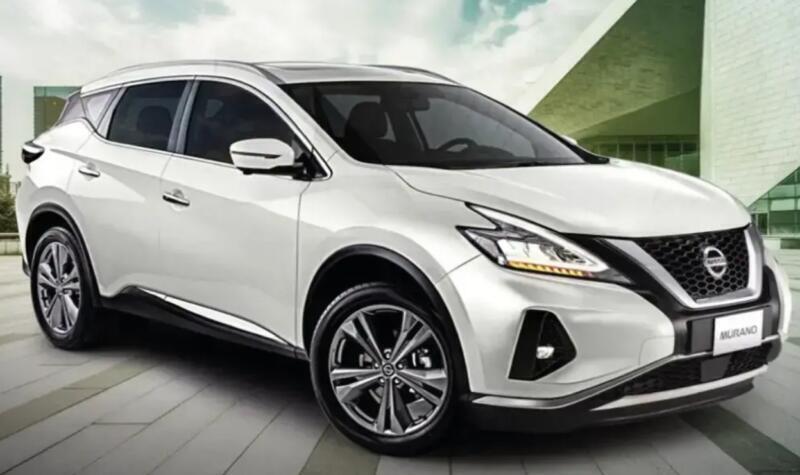
A Nissan Murano key fob not working can turn an ordinary trip into an irritating little puzzle. We press the unlock button. Nothing happens. We press it again, harder this time—as though extra thumb pressure might somehow strengthen the radio signal. Still nothing.
Sometimes the problem is wonderfully simple: a weak coin-cell battery. Other times, the key works for unlocking but the Murano refuses to recognize it when we try to start the engine. In less common situations, the key itself is perfectly healthy and the trouble lies with the vehicle's battery, Intelligent Key antennas, electrical system, or programming.
The good news is that we don't need to immediately assume the key fob is dead.
Nissan's Murano documentation confirms that a discharged Intelligent Key battery can prevent normal key detection, while still allowing the vehicle to be started using a special backup procedure.
So, before buying another key or scheduling an expensive diagnostic appointment, let's work logically through the possibilities.
- Why Is My Nissan Murano Key Fob Not Working?
- Start With the Nissan Murano Key Fob Battery
- How to Replace a Nissan Murano Key Fob Battery
- Try Your Spare Nissan Murano Key
- Nissan Murano Says “No Key Detected”
- Can You Unlock a Murano When the Key Fob Is Dead?
- Could the Nissan Murano's Car Battery Be the Problem?
- Why Does My Murano Key Fob Work Only at Close Range?
- Radio Interference Can Affect Intelligent Key Operation
- Why Does the Key Fob Unlock the Murano but Not Start It?
- Why Does the Murano Start but the Key Fob Buttons Don't Work?
- Check Whether the Key Fob Has Been Damaged
- Does a Nissan Murano Key Fob Need Reprogramming After Battery Replacement?
- When Might the Key Actually Need Programming?
- Don't Randomly Try Internet “Reprogramming Tricks”
- Could a Door Handle Sensor Be the Problem?
- What If Only the Remote Start Isn't Working?
- Nissan Murano Key Fob Troubleshooting: Best Order to Follow
- How to Tell Whether the Problem Is the Key or the Murano
- Should You Buy an Aftermarket Nissan Murano Key Fob?
- Can an Automotive Locksmith Fix a Murano Key Fob?
- When Should We Stop Troubleshooting at Home?
- How to Prevent Future Nissan Murano Key Problems
- What We Should Remember About a Murano Key Fob Failure
- Conclusion: Fixing a Nissan Murano Key Fob That Doesn't Work
- Frequently Asked Questions
- 1. Why is my Nissan Murano not detecting my key fob?
- 2. Will replacing the battery fix a Nissan Murano key fob?
- 3. Can I start my Nissan Murano with a dead key fob battery?
- 4. What battery does a Nissan Murano key fob take?
- 5. Why does my Murano key fob work after I changed the battery but only sometimes?
Why Is My Nissan Murano Key Fob Not Working?
When a Murano key suddenly stops cooperating, the most common possibilities include:
- A weak or completely dead key-fob battery
- Incorrectly installed replacement battery
- Dirty or damaged battery contacts
- Physical damage inside the remote
- Radio-frequency interference
- A weak vehicle battery
- Intelligent Key detection problems
- A damaged door-handle request switch
- Loss of key programming
- Vehicle-side electrical or antenna problems
The symptoms matter because they give us clues.
If the buttons have gradually lost range, the battery immediately moves toward the top of our suspect list. If both keys stopped working on the same morning, however, buying two new key batteries probably isn't the smartest first move. That points us toward the vehicle itself.
Think of troubleshooting as detective work. We aren't throwing parts at the problem; we're following fingerprints.
Start With the Nissan Murano Key Fob Battery
The coin-cell battery inside the remote is easily the first component worth checking.
Nissan specifically treats the Intelligent Key battery as a maintenance item and warns that once the battery becomes discharged, normal keyless starting may require an alternative starting procedure.
A battery doesn't always die like a light bulb, either. It often fades gradually.
Signs Your Murano Key Battery Is Getting Weak
Typical symptoms can include:
- Reduced remote-control range
- Unlocking works only when standing close to the vehicle
- Several button presses are required
- Intermittent lock or unlock operation
- Remote start becomes unreliable
- The vehicle occasionally fails to detect the key
- A Key Battery Low warning appears
Murano quick-reference material specifically documents the Key Battery Low warning on equipped vehicles.
If we're seeing several of those symptoms together, replacing the battery is the sensible first step.
What Battery Does a Nissan Murano Key Fob Use?
Many Nissan key fobs use a CR2032 3-volt lithium coin battery, and Nissan itself states that CR2032 is recommended for most Nissan models. However, battery requirements can vary by key design and model year, so the safest approach is to check the battery already installed or consult the owner's manual for the specific Murano.
That tiny distinction matters.
Installing a battery that physically fits but isn't the specified type can leave us chasing an electrical ghost that we accidentally created ourselves.
How to Replace a Nissan Murano Key Fob Battery
Battery replacement is normally straightforward.
First, remove the mechanical emergency key from the Intelligent Key housing. Carefully separate the two halves of the remote using the appropriate slot or seam in the housing. Avoid jamming a large screwdriver into the case because damaged plastic clips can leave the remote permanently loose.
Remove the old coin battery and note which side faces upward.
Install the new battery using the same polarity orientation as the original battery. Then snap the housing securely together and reinstall the mechanical key.
Afterward, stand near the Murano and test:
- Lock.
- Unlock.
- Panic button.
- Liftgate button, where equipped.
- Remote start, where equipped.
- Intelligent Key door-handle operation.
- Push-button engine start.
That sequence tells us much more than simply pressing unlock once.
The New Battery Didn't Fix It — What Now?
This is where many owners understandably become frustrated.
We replace the battery, expect victory, and the remote remains as silent as a stone.
Don't immediately assume the replacement key is necessary.
Check the basics again.
Was the battery installed in the correct direction? Is there a thin protective sticker on the replacement cell? Is the battery fresh? Are the metal terminals inside the fob touching it firmly?
Even new batteries can occasionally arrive weak after long storage.
Check the Battery Contacts
Take another look inside the remote.
The metal battery contacts should be clean and firmly positioned against the cell. Dirt, corrosion, moisture, or a slightly bent contact can interrupt power.
Avoid aggressive scraping. We're dealing with delicate electronics, not cleaning rust from a garden shovel.
If everything appears clean and secure, move to our next test.
Try Your Spare Nissan Murano Key
If we have a second Intelligent Key, it becomes one of the most useful diagnostic tools available.
Suppose:
Key A doesn't work, but Key B works normally.
The problem is probably related to Key A.
This content may interest you! Toyota RAV4 Hybrid Battery Problems Explained
Now suppose:
Neither Key A nor Key B works correctly.
Suddenly, a problem with the Murano becomes much more plausible.
Possible vehicle-side causes include the 12-volt battery, Intelligent Key receiver components, antennas, wiring, related control modules, or another electrical issue.
This one comparison can prevent us from unnecessarily replacing a perfectly good remote.
Nissan Murano Says “No Key Detected”
Few messages generate more confusion than a Murano refusing to recognize the Intelligent Key sitting right inside the cabin.
The key is there. We can see it. Why can't the car?
Wireless systems aren't quite that simple.
The Murano's Intelligent Key system communicates electronically with the vehicle. A weak key battery or environmental interference can affect normal operation. Nissan's quick-reference material specifically notes that a discharged Intelligent Key battery or environmental conditions can interfere with Intelligent Key operation.
How to Start a Nissan Murano With a Dead Key Fob Battery
On Murano models equipped with push-button ignition, Nissan provides a backup starting procedure when Intelligent Key battery power is low.
Exact details should always be verified against the owner's manual for the model year, but Nissan Murano guidance generally instructs the driver to place the transmission in Park, depress the brake pedal, and bring the Intelligent Key into contact with or immediately adjacent to the ignition/start switch before operating the start button.
Essentially, we're giving the vehicle a much closer opportunity to identify the key.
It's like speaking directly into someone's ear instead of shouting across a crowded room.
If this technique starts the vehicle while ordinary key detection does not, a weak key battery becomes highly suspicious.
Can You Unlock a Murano When the Key Fob Is Dead?
Usually, yes.
The Nissan Intelligent Key contains a mechanical emergency key specifically because electronic systems can fail.
Remove the mechanical key from the fob and use the mechanical door lock where provided.
It's easy to forget the little metal key exists because we might drive for years without touching it. Yet when electronics go dark, that humble piece of metal suddenly becomes the hero of the story.
The emergency key is especially helpful when both the remote battery and the vehicle battery are questionable.
Could the Nissan Murano's Car Battery Be the Problem?
Absolutely.
There's an important difference between:
The key fob being dead
and
the Murano being unable to respond to the key.
The vehicle's Intelligent Key system relies on the vehicle's electrical supply. If the Murano's 12-volt battery is severely discharged, the car may appear completely indifferent to the remote.
Signs the Vehicle Battery Deserves Attention
Look for symptoms such as dim interior lights, clicking when attempting to start, sluggish cranking, dashboard electronics behaving strangely, doors failing to unlock electronically, or electrical features working intermittently.
If the remote fails and the vehicle also appears electrically weak, test the vehicle battery before blaming the fob.
This distinction is particularly useful when both Intelligent Keys fail simultaneously.
Two keys developing identical faults at exactly the same moment would be quite a coincidence. One weak vehicle battery explains the situation much more neatly.
Why Does My Murano Key Fob Work Only at Close Range?
Reduced operating range is practically a classic weak-battery symptom.
A healthy remote might work from a useful distance, but as battery voltage declines, we may find ourselves walking progressively closer to the Murano.
Yesterday it worked from the driveway.
Today we need to stand beside the driver's door.
Tomorrow we may be pressing the remote against the window like we're trying to communicate with a submarine.
Replace the battery before the remote becomes completely unreliable.
But if a fresh battery produces poor range, interference or remote damage becomes more likely.
Radio Interference Can Affect Intelligent Key Operation
The Intelligent Key uses wireless communication, meaning its environment matters.
Certain electronic equipment or strong radio-frequency sources can interfere with normal wireless communication. Nissan's Murano documentation acknowledges that environmental conditions can interfere with Intelligent Key operation.
This content may interest you! Toyota RAV4 Transmission Problems You Should Know
If the key mysteriously stops working in one specific place—yet behaves normally elsewhere—pay attention.
The parking location may be part of the story.
Move the Key Away From Other Electronics
Keep the Murano key separate from devices or objects that might interfere with wireless communication.
Try removing it from a crowded handbag, backpack, metal container, or pocket containing several electronic devices.
Then stand near the vehicle and test it again.
If performance immediately improves, the key probably wasn't broken at all.
Why Does the Key Fob Unlock the Murano but Not Start It?
Now we're entering more interesting territory.
The remote-control portion of the key and the vehicle's Intelligent Key recognition functions are related, but the symptoms don't always fail together.
If the lock and unlock buttons work normally but push-button start repeatedly reports that the key isn't detected, investigate:
- Intelligent Key recognition
- Brake-switch operation
- Key placement
- Vehicle battery condition
- Possible interference
- Intelligent Key antenna or receiver problems
- Key registration issues
Also pay close attention to what the dashboard actually says.
“Key Battery Low,” “No Key Detected,” and a vehicle that simply won't crank are not the same diagnostic problem.
The dashboard message is giving us a clue. We shouldn't ignore it.
The reverse situation can also happen.
Suppose the car recognizes the key inside the cabin and starts normally, yet lock, unlock, or liftgate buttons don't respond.
That suggests we should inspect the remote itself more closely.
Possible causes include a damaged button, worn internal switch, contamination inside the remote, cracked circuit board, failing battery connection, or physical damage to the casing.
If only one button fails while the other buttons work perfectly, the battery is less convincing as the culprit.
For example:
Unlock works.
Panic works.
Liftgate works.
Lock never responds.
That pattern makes the lock button circuit or switch more suspicious than the battery.
Check Whether the Key Fob Has Been Damaged
Key fobs live surprisingly harsh lives.
We drop them.
Sit on them.
Throw them onto kitchen counters.
Leave them in hot cars.
Sometimes they take an unexpected trip through the washing machine.
Eventually, those tiny circuit boards protest.
Signs of Physical Key Damage
Inspect the remote for:
- Cracked housing
- Buttons stuck below the surface
- Loose or rattling parts
- Missing rubber seals
- Corrosion around the battery
- Evidence of moisture
- Broken battery retainers
- Remote working only when squeezed or twisted
A remote that works when pressed together firmly may have an internal connection problem rather than a programming issue.
What If the Murano Key Fob Got Wet?
Remove the battery promptly if the remote has become seriously wet.
Don't repeatedly press buttons while moisture is trapped inside the housing. Applying electrical power to wet electronics can make matters worse.
Allow the components to dry thoroughly before reinstalling a battery.
If corrosion is already visible or the remote behaves erratically afterward, professional repair or replacement may be necessary.
Does a Nissan Murano Key Fob Need Reprogramming After Battery Replacement?
Normally, replacing an ordinary coin-cell battery alone should not automatically mean we need a new key.
The key's registration isn't simply stored in the removable battery.
This content may interest you! Common Toyota RAV4 Suspension Issues
So if the key worked perfectly before the battery died but stopped immediately after we replaced it, first recheck the replacement battery, polarity, contacts, and fob assembly before assuming programming has been erased.
Where programming or registration actually is required, Nissan diagnostic equipment supports key and vehicle diagnostic/programming procedures across applicable model years. Nissan's technical information identifies CONSULT diagnostic equipment as its vehicle diagnostic and programming platform.
That is very different from simply swapping a coin battery.
When Might the Key Actually Need Programming?
Programming becomes more relevant when:
- A replacement key has been purchased
- A used key is being introduced
- A key has lost vehicle recognition after repair
- Vehicle security components were replaced
- The existing key has been damaged or replaced
- Diagnostic testing identifies a registration issue
At that point, professional equipment may be required.
Depending on the vehicle and region, assistance might come from a Nissan dealer or a qualified automotive locksmith equipped for Nissan Intelligent Key systems.
Don't Randomly Try Internet “Reprogramming Tricks”
This deserves its own warning.
Online videos sometimes suggest combinations of ignition cycling, door locking, button pressing, pedal tapping, and other homemade rituals supposedly capable of programming every Nissan key ever manufactured.
Be careful.
Procedures differ dramatically among generations, markets, key systems, and model years. An old remote-entry procedure isn't automatically appropriate for a later Murano Intelligent Key.
If actual key registration is needed, identify the Murano's model year, key type, and system first.
One-size-fits-all automotive advice is usually where confusion begins.
Could a Door Handle Sensor Be the Problem?
Yes—especially if the remote buttons work but the request button on a particular door doesn't.
Imagine this pattern:
The key unlocks the Murano when we press the remote's unlock button.
The passenger-side request function works.
The driver's door request function doesn't.
The engine starts normally.
That's not screaming “dead key battery.”
A door-handle switch, wiring connection, or related vehicle-side component becomes more plausible.
Again, diagnosis becomes easier when we separate which functions work from which functions don't.
What If Only the Remote Start Isn't Working?
A malfunctioning remote-start feature doesn't necessarily mean the key fob itself has failed.
Remote start systems depend on multiple operating conditions. A vehicle may refuse a remote-start command even when ordinary lock and unlock communication is functioning.
Therefore, if lock and unlock work normally but remote start suddenly doesn't, investigate the conditions governing remote start before replacing the Intelligent Key.
The same principle applies to the liftgate.
One failed feature isn't automatically proof of a failed remote.
Nissan Murano Key Fob Troubleshooting: Best Order to Follow
Rather than bouncing randomly between possible repairs, we can follow one simple diagnostic order.
- Try the spare key.
- Observe the dashboard for key-related warnings.
- Replace the suspect fob battery with the correct fresh battery.
- Verify battery polarity and terminal contact.
- Test every remote button individually.
- Test proximity unlocking and push-button starting separately.
- Try the backup Intelligent Key starting procedure if the battery is weak.
- Check the vehicle's 12-volt battery if electrical symptoms exist.
- Move away from possible interference and retest.
- Inspect the remote for water or impact damage.
- Compare operation of both keys again.
- Seek diagnostic testing if neither key behaves correctly.
This order goes from cheap and simple toward complicated and expensive.
That's exactly how troubleshooting should work.
We don't replace the roof because we found a wet towel.
How to Tell Whether the Problem Is the Key or the Murano
Here's a quick mental shortcut.
Probably the Key Fob
The spare key works perfectly, one remote has poor range, only one key shows intermittent behavior, the damaged remote rattles, or the key started acting strangely after being dropped or soaked.
Probably the Vehicle
Both keys fail, the vehicle battery is weak, several electrical systems malfunction simultaneously, both keys stop working at exactly the same time, or Intelligent Key functions fail despite fresh batteries in known-good remotes.
It's not a guaranteed diagnosis, but it's a powerful starting point.
Should You Buy an Aftermarket Nissan Murano Key Fob?
Replacement remotes can vary considerably in quality and compatibility.
A key that looks exactly like ours on the outside isn't automatically electronically compatible with the Murano.
Key frequency, internal electronics, model-year compatibility, button configuration, and vehicle programming requirements matter.
Before ordering a replacement, verify compatibility using the vehicle identification number, model year, original key information, or the appropriate part details.
This content may interest you! Toyota RAV4 Key Fob Not Working: Easy Fixes, Causes, and Smart Troubleshooting Guide
Buying the cheapest remote first and asking compatibility questions later can become false economy.
We might save money on the key and then spend twice as much trying to make it work.
Can an Automotive Locksmith Fix a Murano Key Fob?
A properly equipped automotive locksmith may be able to diagnose, supply, cut, or program compatible keys depending on the Murano's year and key system.
A Nissan dealer is another option and can diagnose vehicle-side Intelligent Key faults using manufacturer-specific systems.
The best choice depends on the problem.
If we've simply lost every key, key replacement and registration are the priority.
If two known-good keys suddenly stopped working and the Murano has electrical symptoms, vehicle diagnostics are more important than buying another remote.
When Should We Stop Troubleshooting at Home?
DIY diagnosis makes sense while we're dealing with batteries, basic inspection, spare-key comparisons, or simple backup-start procedures.
Professional diagnosis becomes sensible when:
- Neither registered key works
- Fresh batteries make no difference
- The vehicle repeatedly reports no key detected
- The 12-volt battery tests healthy
- The key has obvious circuit-board damage
- The Intelligent Key works inconsistently across different vehicle functions
- Vehicle wiring or antennas are suspected
- A new key needs registration
- Security-system faults appear
Modern proximity-key systems are integrated with vehicle electronics and anti-theft systems.
There comes a point where guessing costs more than diagnosis.
How to Prevent Future Nissan Murano Key Problems
Once everything works again, a few habits can reduce future trouble.
Keep the fob dry and avoid exposing it to unnecessary heat or repeated impacts. Replace the battery when low-battery warnings begin instead of waiting until the remote becomes completely unreliable.
Nissan advises replacing the Intelligent Key battery before it becomes fully discharged so keyless functions remain reliable.
If we have two keys, use and test both periodically.
A spare key that has been sitting untouched in a drawer for six years isn't much of a backup if we discover its battery or electronics have failed during an emergency.
Keep a Spare Coin Battery Available
Keeping the correct fresh battery at home can be useful.
They're inexpensive, compact, and far easier to replace in the kitchen than in a dark parking lot during heavy rain.
Just don't buy an enormous lifetime supply.
Coin batteries have shelf lives too, and eventually our “emergency replacement battery” can become another dead battery.
What We Should Remember About a Murano Key Fob Failure
When a Nissan Murano key fob isn't working, the temptation is to jump immediately to the most expensive explanation.
Usually, that's unnecessary.
Start with the simple questions.
Does the spare key work?
Does the dashboard display Key Battery Low?
Have we installed a fresh battery correctly?
Does the remote work only from close range?
Can the Murano start when the Intelligent Key is placed against the start button using the backup procedure?
Does the vehicle itself show signs of a weak 12-volt battery?
Those questions quickly divide the problem into manageable pieces.
Conclusion: Fixing a Nissan Murano Key Fob That Doesn't Work
A Nissan Murano key fob not working isn't automatically a major repair.
In many cases, the solution starts with something as simple as replacing the Intelligent Key battery. Nissan's own guidance confirms that a discharged Intelligent Key battery can interfere with normal operation and provides a backup procedure for starting affected vehicles.
If a new battery doesn't help, we should resist the urge to replace parts randomly.
Compare the spare key. Check the Murano's 12-volt battery. Look for physical damage. Test lock, unlock, proximity detection, and starting separately. Consider interference. Then move toward professional diagnostics only when the simple tests have ruled out the obvious causes.
The key principle is simple: figure out whether the key has stopped talking or the Murano has stopped listening.
Once we know which side of that conversation is broken, finding the solution becomes much easier.
Frequently Asked Questions
1. Why is my Nissan Murano not detecting my key fob?
The Intelligent Key battery may be weak or discharged, wireless interference may be affecting communication, or there may be a vehicle-side Intelligent Key problem. Nissan specifically notes that a discharged battery or environmental conditions can interfere with Intelligent Key operation.
2. Will replacing the battery fix a Nissan Murano key fob?
It often fixes problems caused by a weak fob battery, particularly poor operating range, intermittent button response, and low-key-battery warnings. If a fresh correctly installed battery doesn't help, inspect the key and vehicle systems rather than repeatedly replacing batteries.
This content may interest you! Ford Ranger Key Battery Replacement: Complete DIY Guide
3. Can I start my Nissan Murano with a dead key fob battery?
On applicable push-button-start Murano models, yes. Nissan provides a backup procedure that allows the Intelligent Key to be brought directly against or very close to the ignition/start switch so the vehicle can recognize it despite a discharged fob battery. Check the exact procedure in the owner's manual for your model year.
4. What battery does a Nissan Murano key fob take?
Many Nissan Intelligent Keys use a CR2032 coin-cell battery, and Nissan identifies CR2032 as the recommended battery for most Nissan key fobs. Because key designs can vary, confirm the battery type in your existing remote or your specific Murano owner's manual before replacement.
5. Why does my Murano key fob work after I changed the battery but only sometimes?
Check whether the battery is correctly seated and making solid contact with the terminals. If that looks normal, consider physical fob damage, interference, a weak vehicle battery, or Intelligent Key system issues. Testing a second registered key is one of the fastest ways to determine whether the problem follows the remote or stays with the vehicle.
Leave a Reply