
Can I Start My Toyota RAV4 With My Phone? Complete Guide
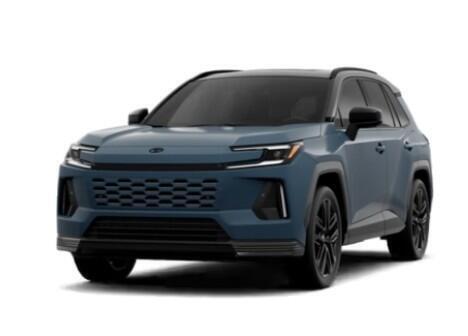
Yes, you may be able to start your Toyota RAV4 with your phone through the Toyota app and Toyota’s Remote Connect service. However, compatibility is not universal. Whether the feature works depends on your RAV4’s model year, trim level, multimedia system, country, connected-services equipment, account status, and subscription.
That sounds like a long checklist for something as simple as tapping a button, doesn’t it?
The good news is that checking compatibility usually takes only a few minutes. Once everything is activated, starting your RAV4 remotely can feel almost magical. You can warm the cabin on a frosty morning, cool it before climbing inside on a hot afternoon, or confirm that the vehicle is locked while standing in a grocery-store checkout line.
Toyota officially identifies remote engine start, remote stop, and door locking or unlocking as Remote Connect functions available through the Toyota app on compatible vehicles. Toyota also notes that these services require compatible equipment and, in many cases, an active trial or paid subscription.
Let’s break down exactly how phone-based remote start works, how to determine whether your RAV4 supports it, and what to do when the start button refuses to cooperate.
- Can You Start a Toyota RAV4 With a Phone?
- What Is Toyota Remote Connect?
- Which Toyota RAV4 Models Support Phone Remote Start?
- How to Check Whether Your RAV4 Has Remote Connect
- How to Set Up Phone Remote Start on a Toyota RAV4
- How to Start Your Toyota RAV4 With Your Phone
- What Happens After Remote Start?
- How Long Will a Remotely Started RAV4 Run?
- Can You Control the Temperature From the Toyota App?
- Do You Need a Subscription to Start a RAV4 With Your Phone?
- Can You Start the RAV4 With the Key Fob Instead?
- Phone Remote Start vs. Toyota Digital Key
- Why Won’t My Toyota RAV4 Start From the App?
- The Remote Connect Subscription Has Expired
- The Vehicle Has Weak Cellular Reception
- The Phone Has No Internet Connection
- A Door, Hood, or Liftgate Is Open
- The RAV4 Is Not in Park
- The Hazard Lights Are On
- The Engine Was Recently Stopped
- The Vehicle Has a Warning or Low-Fuel Condition
- The App Needs to Be Refreshed
- The App or Vehicle Software Is Outdated
- The Account Is No Longer Properly Linked
- A Simple Remote-Start Troubleshooting Checklist
- Can Alexa, Google Assistant, or a Smartwatch Start the RAV4?
- Is Starting a RAV4 With Your Phone Safe?
- Is Toyota App Remote Start Worth It?
- Can Aftermarket Remote Start Be Controlled by Phone?
- Frequently Asked Questions
- Final Thoughts: Starting Your RAV4 From Your Phone
Can You Start a Toyota RAV4 With a Phone?
You can start a compatible Toyota RAV4 using the Toyota app when all of the following conditions are met:
- Your RAV4 supports Remote Connect.
- The vehicle has been added to your Toyota account.
- Connected Services enrollment has been completed.
- Your Remote Connect trial or subscription is active.
- The vehicle has cellular network access.
- The doors, hood, and liftgate are properly closed.
- The vehicle is parked and in an acceptable operating condition.
- Your phone has an internet connection.
When these requirements line up, the Toyota app normally displays controls such as Start, Lock, and Unlock on the vehicle dashboard. Toyota says that visible start, lock, and unlock buttons—and an “Active” vehicle status—indicate that Remote Connect is ready to use.
If the app only shows maintenance records, fuel information, or vehicle health alerts, your RAV4 may not support remote engine start, the service may not be activated, or the subscription may have expired.
What Is Toyota Remote Connect?
Toyota Remote Connect is part of Toyota Connected Services. It links a compatible vehicle to the Toyota app using the vehicle’s built-in communication system.
Instead of communicating directly with the RAV4 over ordinary Bluetooth, the app generally sends a secure command through an internet and cellular network. That is why you may be able to start the vehicle while you are inside an office, restaurant, airport terminal, or home—as long as both the phone and vehicle can communicate with the service.
What Can Remote Connect Do?
Available functions vary by model, year, equipment, software, and region, but Remote Connect may provide access to:
- Remote engine start
- Remote engine stop
- Remote door locking
- Remote door unlocking
- Vehicle-status checks
- Last parked location
- Guest-driver settings
- Notifications about open doors or windows
- Remote climate functions on certain electrified models
- Digital Key on select newer vehicles
- Additional remote commands on selected newer multimedia systems
Think of the app as a digital control panel in your pocket. It does not replace every physical control, but it brings several useful vehicle functions together in one place.
Toyota emphasizes that Remote Connect availability differs between vehicles. Owners should confirm their specific capabilities through the Toyota app or Toyota’s connected-technology tools rather than assuming every RAV4 has identical functions.
Which Toyota RAV4 Models Support Phone Remote Start?
There is no single answer covering every RAV4 sold around the world. Toyota has offered several generations of multimedia hardware, connected-service packages, trim configurations, and regional specifications.
Remote Connect became available on selected Toyota vehicles before it became common across newer lineups. As a result, two RAV4s from the same model year may not provide exactly the same app features.
Compatibility Depends on More Than the Model Year
We should examine several factors:
- Model year: Newer RAV4s are more likely to support Toyota Connected Services.
- Trim level: Entry-level and upper-level trims may have different multimedia or connected-service hardware.
- Factory equipment: A vehicle may need a compatible data communication module.
- Multimedia system: Toyota has used multiple infotainment generations.
- Original market: A Canadian RAV4 may have different features from a similarly named U.S., European, or Australian version.
- Powertrain: Gasoline, hybrid, and plug-in hybrid variants may use different remote-start or climate-control functions.
- Subscription status: Compatible hardware alone does not always guarantee active service.
- Network support: Older communication hardware may be affected by cellular-network changes.
Do Not Rely Only on Online Model-Year Lists
Generic compatibility charts can be useful, but they may overlook midyear production changes, optional equipment, imported vehicles, or regional differences.
The most dependable check is tied to your specific vehicle identification number, or VIN. Add the RAV4 to the Toyota app and review its listed capabilities. Toyota Canada similarly advises owners to check Vehicle Capabilities inside the app or use the appropriate feature-availability tool.
How to Check Whether Your RAV4 Has Remote Connect
Before buying accessories or paying for a subscription, confirm that your actual vehicle supports the service.
Method 1: Check the Toyota App
Download the official Toyota app, create an account, and add your RAV4 using its VIN.
Once registration is complete:
- Open the app.
- Select your vehicle.
- Look for Remote Connect controls.
- Check whether the app displays Start Engine, Lock, or Unlock.
- Review the subscription or Connected Services section.
If a remote-start button appears, your vehicle is likely equipped for the function, although activation may still be required.
Method 2: Review Vehicle Capabilities
Inside the Toyota app, look for a section called Vehicle Capabilities, Connected Services, Subscriptions, or similar wording.
This area may show:
- Remote Connect eligibility
- Trial expiration date
- Current subscription status
- Safety Connect availability
- Service Connect availability
- Drive Connect availability
- Digital Key compatibility
App menus occasionally change after software updates, so the exact labels may look slightly different.
Method 3: Enter the VIN in Toyota’s Compatibility Tool
Toyota provides connected-technology or feature-availability resources in certain markets. A VIN-based check is better than guessing from the trim badge on the liftgate.
The VIN can normally be found:
- At the bottom of the windshield
- On the driver-side door jamb
- On the registration document
- On the insurance documentation
- In the vehicle information screen
Method 4: Contact a Toyota Dealer
A Toyota dealer can often inspect the VIN and factory specifications. Ask a precise question:
Does this VIN have factory-installed Remote Connect with remote engine start through the Toyota app?
This wording matters. A salesperson may say that a vehicle has “connected features,” but that does not automatically mean remote engine start is included.
How to Set Up Phone Remote Start on a Toyota RAV4
If your RAV4 is compatible, setup usually involves installing the app, creating an account, registering the vehicle, and activating Connected Services.
Toyota’s support instructions state that owners must establish an account in the Toyota app before enabling Remote Connect.
Step 1: Download the Official Toyota App
Install the Toyota app from the Apple App Store or Google Play Store.
Avoid similarly named third-party apps. The official app should be published by Toyota’s authorized regional organization.
Step 2: Create or Sign In to Your Toyota Account
Use an email address you can access easily. You may need to verify it before registration continues.
A strong password and device-level security are sensible choices because the app may provide access to vehicle information and remote commands.
Step 3: Add Your Toyota RAV4
Enter the VIN manually or scan it when the app provides that option.
Double-check every character. Confusing a zero with the letter O or a one with the letter I can send the setup process into a ditch before we even leave the driveway.
Step 4: Complete Ownership Verification
Toyota may request verification to ensure that you are authorized to control the vehicle.
Depending on the model and multimedia generation, the process may involve:
- Entering a code displayed in the vehicle
- Entering an authorization code into the multimedia system
- Accepting terms and privacy notices
- Confirming ownership information
- Starting the vehicle with the physical key nearby
- Following prompts from the app or infotainment screen
Some Toyota systems use a six-digit authorization code during enrollment.
Step 5: Activate Remote Connect
Open the subscriptions or Connected Services section and activate the available trial. If the trial has already ended, the app may ask you to select a paid plan.
Step 6: Allow the System to Synchronize
Vehicle registration is not always instantaneous. Refresh the app and confirm that the RAV4 status changes to active.
Once enrollment is complete, remote controls should appear on the main vehicle screen.
How to Start Your Toyota RAV4 With Your Phone
Although app layouts can change, the basic process is usually straightforward.
- Park the RAV4 in a safe, ventilated location.
- Confirm that the doors, hood, and liftgate are closed.
- Open the Toyota app.
- Sign in if required.
- Select your RAV4.
- Refresh the vehicle status.
- Press and hold the Start or Start Engine control.
- Complete biometric or account authentication if requested.
- Wait for confirmation.
The app may display a progress circle while the command travels to the vehicle. Do not repeatedly tap the start button. Sending several commands is like pressing an elevator button ten times—it rarely makes the system move faster.
When successful, the app should confirm that the engine or climate system has started.
What Happens After Remote Start?
Remote start prepares the vehicle, but it does not necessarily make it ready to drive immediately.
On many systems, the vehicle remains locked while running. Depending on the model year and configuration, the engine may shut off when a door opens, or the driver may be able to enter, authenticate the key, press the brake pedal, and transition into normal operation.
Toyota stated in a 2025 support update that select 2023-and-newer models equipped with Remote Connect may permit remote start followed by drive-off. That means behavior varies, so we should not assume every RAV4 operates the same way.
Why Some RAV4s Shut Off When the Door Opens
Owners sometimes interpret this as a malfunction. In many vehicles, it is an intentional security strategy.
The shutdown prevents a person without the registered key from entering a remotely started vehicle and driving away. It may feel clumsy, but it acts like a digital drawbridge: the cabin can be prepared while the path to actually driving remains protected.
Newer systems may handle the handoff more smoothly.
How Long Will a Remotely Started RAV4 Run?
Remote-start sessions are time-limited. The exact duration and number of permitted extensions can vary by model, software, and market.
The purpose of the limit is simple: remote start is designed to prepare the cabin, not leave the vehicle idling indefinitely.
Check your owner’s manual and the instructions displayed in the Toyota app for the rules applicable to your RAV4.
Can You Extend the Remote-Start Session?
Some configurations allow another start command or a limited extension. Others require the engine to shut down before a new remote-start cycle can begin.
Do not rely on remote start to keep pets, children, or vulnerable passengers safe inside a parked vehicle. Connectivity can fail, the engine can stop, and cabin temperatures can change quickly.
Can You Control the Temperature From the Toyota App?
This depends heavily on the RAV4 variant.
Gasoline RAV4 Models
On many gasoline models, remote engine start activates the climate-control system using the settings left in place when the vehicle was turned off.
For example, if we leave:
- The temperature set to a comfortable level
- The fan in automatic mode
- The heated seats activated where supported
- The defroster configured appropriately
…the cabin may begin warming or cooling during the remote-start session.
However, app-based temperature adjustment may not be available on every version.
RAV4 Hybrid Models
Hybrid vehicles can behave differently from conventional gasoline models. The gasoline engine may not run continuously because the hybrid system decides when engine operation is necessary.
The vehicle can still be “on” and managing cabin conditions even when the engine is temporarily silent.
This content may interest you! Best Brake Pads for Ford Ranger
RAV4 Plug-In Hybrid Models
Plug-in hybrid models may offer remote climate functions that prioritize cabin conditioning rather than traditional engine idling. Feature availability still depends on model, market, equipment, charging state, and subscription.
Toyota’s current Canadian information for the 2026 RAV4 Plug-in Hybrid states that Remote Connect functions require app registration and an active trial or paid subscription, while individual remote functions remain limited to selected models.
Do You Need a Subscription to Start a RAV4 With Your Phone?
In many cases, yes.
A compatible RAV4 may include a complimentary Remote Connect trial when it is new. Once that trial expires, continued app-based remote control may require a paid subscription.
Toyota’s U.S. Connected Services information says that Remote Connect can be used through the Toyota app—or through the key fob on supported vehicles—when an active trial or paid subscription is in place.
Why Does Remote Start Require a Subscription?
Phone-based remote start depends on more than a starter motor and key signal. The service may involve:
- Cellular communication
- Cloud infrastructure
- Account authentication
- App development
- Security monitoring
- Vehicle-data transmission
- Customer support
- Ongoing software maintenance
Whether the subscription feels worthwhile depends on how often we use the feature.
For someone facing icy Canadian mornings or sweltering summer parking lots, Remote Connect may feel like a daily luxury. For someone living in a mild climate and parking in a garage, it may become a button that gathers digital dust.
Can the Trial Transfer to a Used Owner?
Trial eligibility on a used RAV4 varies. The original trial may have expired, remain tied to the vehicle, or be replaced by a certified-used connected-services offer.
A used buyer should remove the previous owner’s access, register the vehicle under a new Toyota account, and review the current subscription page. Never assume that an advertisement saying “remote start equipped” means app service will remain free.
Can You Start the RAV4 With the Key Fob Instead?
Some Remote Connect-equipped Toyota vehicles can also be remotely started with the factory key fob.
Toyota’s documented sequence for supported vehicles begins by pressing the lock button twice and then pressing and holding it again.
A commonly used sequence is:
- Press Lock once.
- Press Lock again shortly afterward.
- Press and hold Lock on the third press.
- Watch for the lights to flash and the vehicle to start.
The timing matters. Press too slowly and the RAV4 may simply lock itself three times, as if politely reminding us that it heard every command but misunderstood the assignment.
Does Key-Fob Start Also Require Remote Connect?
Requirements vary by vehicle, country, and service arrangement. On certain Toyota models, key-fob remote start is associated with Remote Connect eligibility or subscription status.
Test the feature on your own vehicle and confirm the terms attached to your VIN. Do not assume that because the key fob has no dedicated circular-arrow button, remote start is impossible.
Phone Remote Start vs. Toyota Digital Key
Remote Connect and Digital Key are related but different.
Remote Connect
Remote Connect sends commands through the Toyota app. It may allow us to start the engine, stop it, lock doors, unlock doors, or check vehicle status from a distance.
Digital Key
Digital Key can allow a compatible smartphone to function more like a physical smart key on selected vehicles. Depending on the implementation, the phone may be used to unlock and start the vehicle when nearby.
Digital Key relies on compatible hardware, a supported smartphone, Bluetooth, app registration, and an applicable Remote Connect trial or subscription. Toyota also warns that availability varies by vehicle and region.
The Practical Difference
Remote Connect is like sending an instruction to your RAV4 from across town.
Digital Key is more like carrying the key inside your phone.
A RAV4 may support Remote Connect without supporting Digital Key. Seeing a remote-start button does not automatically mean you can leave the physical key at home.
Why Won’t My Toyota RAV4 Start From the App?
Remote start can fail even when the vehicle is compatible. Fortunately, the cause is often simple.
The Remote Connect Subscription Has Expired
Open the app’s subscriptions section. If Remote Connect is inactive, reactivate it if desired.
The Vehicle Has Weak Cellular Reception
An underground garage, remote mountain road, concrete structure, or network outage can interrupt communication.
Your phone may show a perfect Wi-Fi signal while the RAV4 itself has no usable cellular connection.
The Phone Has No Internet Connection
Switch between Wi-Fi and mobile data. Open another app or webpage to verify that the phone is online.
A Door, Hood, or Liftgate Is Open
Remote start may be rejected when the vehicle detects an unsecured entry point.
Check:
- All passenger doors
- The hood
- The rear liftgate
- The panoramic-roof or window status where relevant
The RAV4 Is Not in Park
Remote start normally requires the transmission to be in Park.
The Hazard Lights Are On
Certain vehicle conditions, warning states, or active systems may prevent a remote-start command.
The Engine Was Recently Stopped
The system may require a brief pause before accepting another command.
The Vehicle Has a Warning or Low-Fuel Condition
A serious warning light, low fuel level, weak 12-volt battery, or other detected problem may block remote operation.
The App Needs to Be Refreshed
Toyota recommends performing a vehicle-status check, refreshing the screen, and retrying the remote-start command. Its support guidance also suggests standing at least 20 feet from the vehicle during troubleshooting.
The App or Vehicle Software Is Outdated
Update the Toyota app through your phone’s app store. Also check whether the vehicle’s multimedia system has a pending software update.
The Account Is No Longer Properly Linked
This can occur after:
- Purchasing the RAV4 used
- Changing phones
- Changing email addresses
- Resetting the multimedia system
- Transferring vehicle ownership
- Removing and reinstalling the app
Remove and re-add the vehicle only after confirming that doing so will not interfere with an active subscription.
A Simple Remote-Start Troubleshooting Checklist
When the start command fails, try this order:
- Confirm that the RAV4 is parked outdoors or in a ventilated area.
- Check that all doors, the hood, and liftgate are closed.
- Verify that the vehicle is in Park.
- Confirm sufficient fuel or charge.
- Refresh the vehicle status in the Toyota app.
- Check the Remote Connect subscription.
- Confirm that the phone has internet access.
- Move away from the vehicle and retry.
- Force-close and reopen the app.
- Update the Toyota app.
- Restart the phone.
- Test the factory key-fob sequence.
- Contact Toyota Connected Services support or a dealer.
This sequence moves from quick fixes to more involved steps. There is little reason to reset an account before checking whether the hood is slightly open.
Can Alexa, Google Assistant, or a Smartwatch Start the RAV4?
Third-party voice-assistant and smartwatch support has changed over time and differs by market.
Some Toyota owners have previously had access to remote commands through compatible connected devices or voice services, while others have only the controls provided inside the Toyota app.
Because integrations can be added, discontinued, or restricted, check the current Toyota app, your phone’s wearable application, and Toyota’s regional support information.
Never assume an old tutorial still applies. Connected-car technology ages more like a smartphone app than a metal door handle.
Is Starting a RAV4 With Your Phone Safe?
The system uses authentication and vehicle safeguards, but safe operation still depends on the driver.
Never Remote-Start in an Enclosed Space
Do not start a gasoline or hybrid vehicle in a closed garage or poorly ventilated structure. Exhaust gases can accumulate and create a life-threatening carbon-monoxide hazard.
Open garage doors do not automatically make every space safe. Follow the vehicle manual and local safety guidance.
Check the Surroundings
Before sending a remote command, make sure you know where the vehicle is and whether starting it is appropriate.
Protect Your Toyota Account
Use:
- A unique password
- Phone screen-lock protection
- Biometric authentication where available
- Current account-recovery information
- Prompt removal of old devices
- Immediate access removal after selling the vehicle
Remove Previous Owners and Drivers
When buying a used RAV4, ensure the former owner no longer has remote access. When selling, remove the vehicle from your account and follow Toyota’s ownership-transfer process.
Toyota allows authorized Remote Connect access to be shared with another driver on supported accounts, but control should only be granted to trusted people.
Is Toyota App Remote Start Worth It?
That depends on climate, routine, parking habits, and subscription price.
Remote Connect May Be Worth It When We:
- Park outside during winter
- Live in a very hot climate
- Regularly forget whether the doors are locked
- Need to locate the vehicle in large parking areas
- Share the RAV4 with family members
- Appreciate vehicle-status notifications
- Use remote start several times per week
It May Be Less Valuable When We:
- Park in a climate-controlled garage
- Rarely experience extreme temperatures
- Drive the RAV4 infrequently
- Prefer using the key fob
- Have unreliable cellular coverage
- Only want remote start a few times per year
The feature is a convenience, not an essential ingredient of RAV4 ownership. It is like heated seats: easy to dismiss until the first freezing morning, then strangely difficult to live without.
Can Aftermarket Remote Start Be Controlled by Phone?
Yes, aftermarket systems can add smartphone remote start to some RAV4s that lack factory Remote Connect.
An aftermarket setup may include:
- A remote-start module
- A cellular communication module
- A smartphone app
- Security-system integration
- A separate subscription
- Optional long-range remotes
Potential Advantages
- Compatibility with older RAV4 models
- Longer remote range
- Dedicated key-fob options
- Additional alarm features
- More flexible installation packages
Potential Disadvantages
- Installation cost
- Possible monthly or annual fees
- Dependence on installation quality
- Compatibility concerns with hybrid systems
- Potential electrical issues
- Warranty disputes if damage results from improper installation
Choose an installer experienced with the exact RAV4 model year and powertrain. Modern vehicle electronics resemble a nervous system; careless splicing can cause problems far beyond the starter circuit.
Frequently Asked Questions
1. Can I Start Any Toyota RAV4 With the Toyota App?
No. Only compatible RAV4 models equipped with the required Connected Services hardware and an eligible Remote Connect service can be started through the Toyota app. Check the Vehicle Capabilities section using your VIN.
The vehicle may not support remote engine start, registration may be incomplete, Remote Connect may be inactive, or the app may not have synchronized correctly. Verify your subscription and vehicle capabilities first.
3. Can I Drive My RAV4 Without the Key After Starting It With My Phone?
Usually, you still need an authorized physical key or compatible Digital Key before driving. Selected newer vehicles may support a smoother remote-start-to-drive transition, but operation varies by model.
4. Does Toyota Remote Start Turn On the Heat or Air Conditioning?
It can prepare the cabin using stored climate settings, although exact behavior varies by gasoline, hybrid, and plug-in hybrid model. Some versions offer more direct climate control than others.
5. Can I Add Phone Remote Start to an Older Toyota RAV4?
Possibly. If the vehicle lacks factory Remote Connect, a professionally installed aftermarket remote-start system with smartphone control may be an option. Confirm compatibility before purchasing.
Final Thoughts: Starting Your RAV4 From Your Phone
So, can you start your Toyota RAV4 with your phone? In many compatible models, absolutely. The Toyota app and Remote Connect can place engine start, door controls, and vehicle information in the palm of your hand.
The important word is compatible.
Model year alone does not tell the whole story. Trim, multimedia equipment, market, subscription status, cellular service, and vehicle configuration all matter. The fastest route to a definite answer is to add your VIN to the Toyota app and review Vehicle Capabilities.
When everything is activated, remote start transforms an ordinary routine into a small everyday luxury. The cabin can begin warming while we finish breakfast, or start cooling while we walk across a sun-baked parking lot. It is not quite a personal chauffeur—but on an icy morning, it comes surprisingly close.
This content may interest you! Ford Ranger Key Battery Replacement: Complete DIY Guide
Leave a Reply